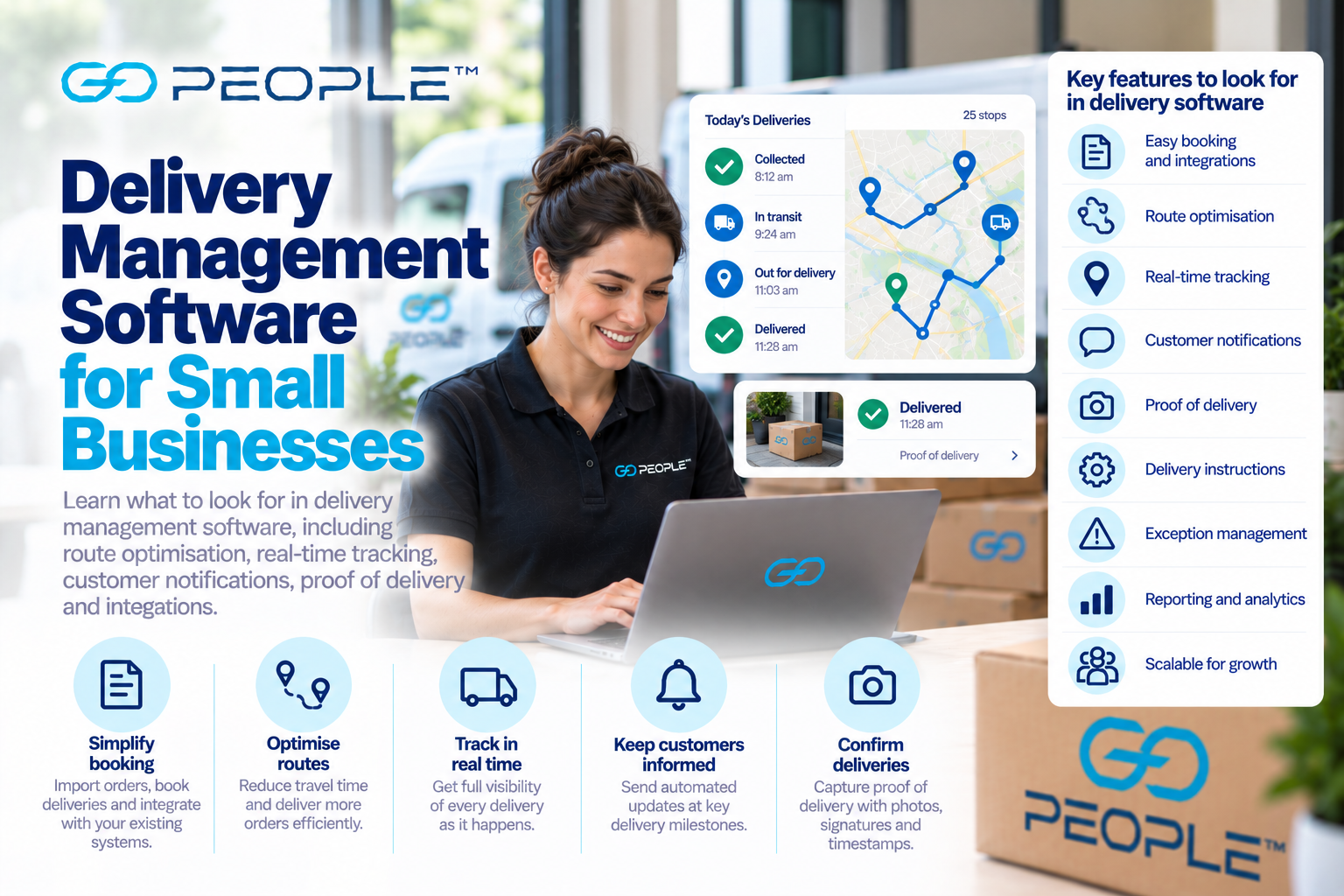
Delivery management software can make a small delivery operation much easier to run.
Instead of coordinating jobs through spreadsheets, phone calls, text messages and separate mapping tools, businesses can use one system to organise deliveries, plan routes, track progress, communicate with customers and record proof of delivery.
But not every business needs the same technology.
A retailer delivering 15 local orders each afternoon has very different requirements from an ecommerce business sending hundreds of parcels through a delivery network. A florist may care heavily about delivery windows. A wholesaler may need recurring B2B routes. Another business may simply want customers to stop calling to ask where their orders are.
The right question is therefore not:
“What is the best delivery software?”
It is:
“What delivery problems does our business need the software to solve?”
This guide explains the most useful delivery management software features, what small businesses should look for and when outsourcing part or all of the delivery operation may make more sense than buying software alone.
What Is Delivery Management Software?
Delivery management software helps businesses organise and monitor the process of moving orders from a pickup location to customers.
Depending on the platform, it may help with:
- delivery booking;
- order importing;
- driver allocation;
- route planning;
- route optimisation;
- dispatch;
- GPS visibility;
- delivery tracking;
- customer notifications;
- delivery instructions;
- proof of delivery;
- exception management;
- reporting; and
- integrations with other business systems.
Some platforms are primarily designed for businesses operating their own delivery fleet.
Others connect businesses with external delivery providers.
Some delivery companies combine the two by providing the technology and the physical delivery service.
Understanding this difference is important before comparing platforms.
Do Small Businesses Need Delivery Management Software?
Not necessarily.
If your business sends two or three deliveries each week, manually booking them may be perfectly reasonable.
Delivery software becomes more valuable when coordination itself starts becoming a problem.
Signs that you may need a better system include:
- staff manually entering large numbers of deliveries;
- drivers receiving routes through text messages;
- customers frequently asking where orders are;
- routes being planned manually every day;
- delivery addresses being copied between systems;
- support staff struggling to investigate delivery issues;
- proof of delivery being difficult to locate;
- multiple staff maintaining different spreadsheets;
- deliveries regularly being missed or duplicated; or
- delivery volume becoming difficult to manage.
The objective is not to introduce technology for its own sake.
Software should remove operational friction.
1. Easy Delivery Booking
The starting point is getting delivery information into the system.
For a small number of deliveries, individual booking may be enough.
As volume increases, look for options such as:
- bulk booking;
- CSV uploads;
- ecommerce integrations;
- APIs;
- order-management integrations; and
- automated booking workflows.
Consider a business sending 80 parcels each day.
If an employee spends two minutes manually entering each delivery:
80 deliveries × 2 minutes = 160 minutes
That’s more than 2.5 hours of administrative work every day.
Reducing repetitive data entry can save time and also reduce the risk of addresses or contact details being entered incorrectly.
2. Route Optimisation
Route optimisation is particularly important for businesses making multiple deliveries from one pickup location.
Imagine a business needs to make 25 deliveries.
There are countless possible sequences in which those stops could be completed.
Simply delivering in the order customers placed their orders is unlikely to create the most efficient route.
Route optimisation can help organise stops based on factors such as:
- destination locations;
- travel distance;
- route geography;
- delivery constraints; and
- other operational requirements supported by the system.
The objective is to reduce unnecessary travel while creating a workable delivery sequence.
For businesses with regular multi-drop requirements, this can be one of the most valuable delivery-software capabilities.
For more detail, see Delivery Route Optimisation for Businesses.
3. Real-Time Delivery Tracking
Once deliveries leave the warehouse, businesses need visibility.
Without tracking, operations teams may rely on phone calls:
“Where are you?”
“Have you delivered order 482?”
“How long until you reach the next customer?”
That becomes increasingly inefficient as delivery volume grows.
Delivery tracking can help teams understand:
- whether an order has been collected;
- current delivery status;
- whether delivery is progressing;
- whether an attempt occurred;
- whether the delivery was completed; and
- whether an exception requires attention.
Tracking also helps customer-service teams investigate problems without constantly contacting drivers or operations staff.
For more detail, see How GPS Tracking Works in Delivery Operations.
4. Customer Tracking
Internal visibility is only half of the equation.
Customers also want to understand what is happening with their order.
Useful customer tracking may include:
- tracking links;
- current delivery status;
- progress updates;
- delivery attempt information; and
- delivery confirmation.
This can reduce one of the most common ecommerce support questions:
“Where is my order?”
Customers should not necessarily see every piece of internal operational information.
The goal is to provide enough information to understand the delivery without creating confusion.
5. Customer Notifications
Good delivery software should help businesses communicate important delivery events.
Depending on the system and service, notifications may include:
- order dispatched;
- parcel collected;
- delivery scheduled;
- out for delivery;
- delivery delayed;
- delivery attempted; and
- delivery completed.
Notifications can be delivered through channels such as email or SMS depending on the platform.
The important consideration is relevance.
Customers do not need a message every time something changes internally.
They need updates that help them understand:
What is happening?
Do I need to do anything?
Has my delivery been completed?
6. Proof of Delivery
Once a delivery is completed, the business needs a record.
Depending on the delivery system, proof of delivery may include:
- timestamp;
- photograph;
- signature where applicable;
- recipient confirmation;
- completion status; or
- other delivery evidence.
This becomes particularly important when a customer reports:
“Tracking says delivered, but I can’t find my parcel.”
If proof of delivery is easily accessible, support teams can investigate more efficiently.
When comparing software, ask:
- What proof is captured?
- Where is it stored?
- Who can access it?
- How long is it retained?
- Can customer service find it easily?
A feature is only useful if the people who need it can actually access it.
7. Delivery Instructions
Delivery software should allow important delivery information to reach the person completing the job.
This might include:
- apartment access;
- reception location;
- loading dock;
- business receiving instructions;
- unit number;
- contact information; and
- other relevant delivery notes.
Missing instructions can contribute to failed deliveries.
For example, an address may be correct but the driver may not know:
- which building entrance to use;
- where reception is;
- how to access a gated property; or
- where a business accepts deliveries.
Good software should make useful instructions visible at the appropriate point in the delivery process.
8. Exception Management
The easiest delivery to manage is one that goes exactly according to plan.
The value of delivery software becomes more obvious when something goes wrong.
Common exceptions include:
- incorrect address;
- recipient unavailable;
- inaccessible building;
- delivery delay;
- failed attempt;
- parcel not ready;
- route disruption; and
- other unexpected events.
Ask how the software handles these situations.
Can your team see that an exception has occurred?
Can customer service understand what happened?
Can the recipient receive an appropriate update?
Is the reason recorded for later analysis?
A system that only shows successful deliveries gives businesses an incomplete view of their operation.
9. Driver Management
Businesses operating their own fleet may need software that supports driver management.
Possible requirements include:
- driver allocation;
- route assignment;
- job acceptance;
- delivery sequence;
- navigation;
- status updates;
- proof-of-delivery capture; and
- operational communication.
However, this creates an important distinction when selecting software.
Own-fleet model
Your business employs or engages drivers and uses software to manage them.
Outsourced-delivery model
A delivery provider manages the drivers and delivery operations for you.
The software requirements are different.
If your business does not want to recruit, manage and coordinate drivers, buying fleet-management software may solve the wrong problem.
10. Mobile Driver Experience
If drivers need to interact with the platform, the mobile experience matters.
A driver may need to:
- see assigned deliveries;
- access addresses;
- view instructions;
- navigate;
- update delivery status;
- capture proof of delivery;
- report exceptions; and
- move to the next stop.
Complicated workflows can create delays and incomplete data.
When evaluating a system, don’t only look at the management dashboard.
Look at what the driver actually needs to do at each delivery.
A sophisticated back office combined with a poor driver experience can still create operational problems.
11. Integrations
Delivery does not exist in isolation.
Order information may originate from:
- an ecommerce platform;
- warehouse-management system;
- order-management system;
- ERP;
- CRM; or
- another business application.
If staff must repeatedly copy information from one system to another, the process becomes slower and more error-prone.
Useful integration options can include:
- native ecommerce integrations;
- APIs;
- webhooks;
- CSV import/export; and
- connections with order or warehouse systems.
The goal is to reduce unnecessary manual steps between:
Customer order → fulfilment → delivery booking → tracking → completion
12. Address Validation
Bad data creates delivery problems.
An address might be missing:
- street number;
- unit number;
- suburb;
- postcode; or
- other essential information.
Delivery software may include or connect with address-validation functionality to help reduce errors.
But technology cannot solve every address problem.
Businesses should also design checkout and booking forms carefully.
For example, customers should be encouraged to provide:
- apartment/unit information;
- business name where relevant;
- useful access instructions; and
- correct contact details.
Address quality should be improved as early as possible in the order process.
13. Delivery Time Windows
Some businesses need more than simply:
Deliver today.
A florist may have event deadlines.
A B2B supplier may need to deliver while reception is open.
A school may only accept deliveries during certain hours.
A retailer may offer customers specific delivery windows.
If time windows matter to your operation, ask whether the software can:
- store them;
- incorporate them into planning;
- show them to drivers; and
- identify when they are at risk.
A route that minimises kilometres but misses important customer time windows is not necessarily an effective route.
14. Reporting and Analytics
Delivery software should help businesses learn from what happened.
Useful reporting may include:
- number of deliveries;
- delivery completion;
- on-time performance;
- failed deliveries;
- first-attempt success;
- delivery exceptions;
- route performance;
- driver performance where relevant;
- support issues; and
- delivery costs.
The specific metrics will depend on the operation.
The important question is whether the data helps answer:
“Where are our delivery problems occurring?”
Reporting should lead to decisions, not simply dashboards.
15. Delivery Cost Visibility
Small businesses need to understand what deliveries actually cost.
Depending on the software or delivery provider, useful information may include:
- price per delivery;
- route cost;
- distance;
- surcharges;
- additional fees;
- redelivery costs; and
- total delivery spend.
But don’t focus only on the courier charge.
A more complete view is:
Total delivery cost = delivery charges + administration + driver management + failed deliveries + redeliveries + customer support + other operational costs
Software that saves administrative time or reduces failed deliveries can create value even if the headline delivery price does not change.
16. User Permissions
As a business grows, several teams may need delivery information.
For example:
Warehouse
Needs booking and pickup information.
Operations
Needs route and delivery visibility.
Customer service
Needs tracking and proof of delivery.
Finance
Needs cost and billing information.
Management
Needs reporting and performance information.
Not everybody necessarily needs access to everything.
Role-based permissions can become useful as more staff use the system.
17. Scalability
A system that works for 10 deliveries may not work for 1,000.
Consider where the business is heading.
Ask:
- Is there a practical delivery limit?
- Can orders be imported in bulk?
- Can multiple users access the system?
- Can multiple pickup locations be supported?
- Can workflows be automated?
- Can integrations replace manual booking?
- Can reporting handle larger volumes?
- Can different delivery services be used?
Avoid buying enterprise complexity that your business does not need.
But also avoid building a process that requires a complete replacement as soon as delivery volume grows.
18. Ease of Implementation
Feature lists can be misleading.
A platform may technically support dozens of functions but require substantial implementation before your business can use them.
Ask:
- How long does setup take?
- Is technical development required?
- Is an API integration necessary?
- Can we start manually and integrate later?
- What training is required?
- Can existing order data be imported?
- What support is available during setup?
For small businesses, simplicity often matters more than having every possible feature.
A system that solves 90% of your requirements and is actually used may be more valuable than a complex platform that never gets properly implemented.
19. Support
Delivery technology supports a real-world operation.
When something stops working, parcels may still be moving.
Ask:
- What support channels are available?
- When is support available?
- Is support for technical issues, delivery issues or both?
- Who handles delivery exceptions?
- How are urgent issues escalated?
- Is documentation available?
This is particularly important when comparing pure software with a delivery provider that also supplies technology.
With software alone, your business may still be responsible for resolving all driver and delivery problems.
Delivery Software vs Delivery Service
This is one of the most important decisions for a small business.
Do you need software to manage your own deliveries, or do you need someone to perform the deliveries as well?
Delivery software only
Your business may remain responsible for:
- drivers;
- vehicles;
- recruitment;
- availability;
- driver management;
- delivery capacity;
- operational support; and
- transport execution.
The software helps coordinate the operation.
Outsourced delivery service
The delivery provider performs the transport operation while providing technology for booking, tracking and delivery management.
This may reduce the need for the business to operate its own fleet.
Neither approach is universally better.
The right model depends on:
- delivery volume;
- geography;
- operational expertise;
- driver availability;
- delivery frequency;
- internal resources; and
- how much control the business wants to retain.
When Running Your Own Fleet Makes Sense
An internal fleet can make sense when a business has:
- highly predictable delivery volumes;
- specialised vehicle requirements;
- tightly controlled delivery areas;
- recurring routes;
- existing transport expertise; or
- specific operational requirements that justify dedicated internal resources.
In this case, fleet and delivery-management software can help coordinate the operation.
But remember that the business must manage more than software.
It must also manage:
- vehicles;
- drivers;
- scheduling;
- leave;
- breakdowns;
- capacity;
- compliance;
- operational exceptions; and
- delivery performance.
Those costs should be included when comparing options.
When Outsourcing Delivery Makes Sense
Outsourcing may be attractive when a business wants delivery capability without building a complete transport operation internally.
This can be useful when:
- delivery volumes fluctuate;
- the business lacks driver-management expertise;
- operating a fleet is not a core capability;
- several delivery models are required;
- the business wants to reduce operational complexity; or
- delivery demand is growing faster than internal resources.
A business might still use technology extensively while outsourcing the physical delivery.
The key is understanding which operational responsibilities remain with the business and which move to the provider.
What Features Matter Most?
Not every small business needs every feature.
A practical priority framework might look like this:
| Feature | Usually important when… |
|---|---|
| Easy booking | You regularly create delivery jobs |
| Bulk import | You send many orders at once |
| Route optimisation | One pickup generates many destinations |
| Tracking | Customers and staff need delivery visibility |
| Notifications | Customers frequently ask for updates |
| Proof of delivery | You need evidence of completion |
| Integrations | Manual data entry is becoming inefficient |
| Driver management | You operate your own fleet |
| Reporting | You want to improve delivery performance |
| Exception management | Failed or delayed deliveries create support work |
Start with the operational problems creating the greatest cost or frustration.
A Delivery Software Evaluation Checklist
When comparing platforms, ask:
Booking
- Can we create deliveries easily?
- Can we upload jobs in bulk?
- Can orders be imported automatically?
Routing
- Can the system optimise multiple stops?
- Can it accommodate delivery constraints?
Tracking
- Can our team see delivery progress?
- Can customers track deliveries?
Communication
- Are customer notifications supported?
- Are important delivery events communicated?
Proof of delivery
- What evidence is captured?
- How easily can our support team find it?
Exceptions
- How are failed deliveries displayed?
- Can we see why delivery failed?
Integrations
- Does it connect with our ecommerce or order systems?
- Is an API available if required?
Reporting
- Can we measure delivery performance?
- Can we identify recurring problems?
Operations
- Do we need to supply our own drivers?
- Who manages delivery exceptions?
Growth
- Will the system still work if our delivery volume increases significantly?
Common Delivery Software Mistakes
Choosing based on the longest feature list
More features do not automatically create better operations.
Ignoring the driver experience
A difficult driver workflow can create poor data and slow deliveries.
Ignoring customer tracking
Internal efficiency matters, but delivery is also part of the customer experience.
Automating a bad process
Software can make an inefficient process happen faster.
Fix the underlying workflow as well.
Buying fleet software when you don’t want to manage a fleet
Technology cannot remove the operational responsibilities of running vehicles and drivers.
Focusing only on monthly software cost
Consider labour, failed deliveries, customer support and delivery execution as well.
How GoPeople Fits Into Delivery Management
GoPeople combines delivery technology with business delivery services rather than operating purely as standalone delivery-management software.
Businesses can choose between different delivery models depending on the order requirement.
GoEXPRESS supports next-day business delivery.
GoBUNDLE is designed for multi-drop delivery runs and includes route optimisation, tracking and proof of delivery.
GoSAMEDAY supports same-day business delivery.
GoVIP supports urgent on-demand courier requirements.
This means businesses should consider both sides of the decision:
What delivery technology do we need?
and
Who is actually going to perform the deliveries?
Service availability varies by service and pickup location, so businesses should check eligibility for their requirements.
Start With the Problem, Not the Software
Before choosing a delivery-management platform, write down the problems you are actually trying to solve.
For example:
“We spend two hours every morning manually entering orders.”
You probably need better booking automation or integration.
“Customers constantly call asking where their parcels are.”
You probably need better tracking and notifications.
“Our drivers spend too much time planning routes.”
Route optimisation may be important.
“We can’t prove where parcels were delivered.”
Improve proof-of-delivery processes.
“Managing drivers is becoming a full-time job.”
The problem may not be software at all. You may need to reconsider whether operating your own delivery fleet remains the right model.
The best delivery-management system is not necessarily the one with the most features.
It is the one that removes the biggest operational problems without creating unnecessary complexity.
Frequently Asked Questions
What is delivery management software?
Delivery management software helps businesses organise deliveries, including booking, dispatch, routing, tracking, customer notifications, proof of delivery, exception management and reporting. Features vary significantly between platforms.
Do small businesses need delivery management software?
Not every small business does. It becomes more useful when delivery volume increases, manual booking takes too much time, routes become difficult to manage or customers and staff need better delivery visibility.
What is the difference between route optimisation and delivery tracking?
Route optimisation helps determine an efficient sequence for completing multiple deliveries. Delivery tracking provides visibility into the progress or status of deliveries after the operation begins.
Can delivery software reduce failed deliveries?
It can help by improving address information, delivery instructions, tracking, notifications and exception visibility. However, software cannot eliminate every failed delivery because recipient availability, building access and other real-world factors still matter.
What should small businesses look for in delivery software?
Priorities often include easy booking, route optimisation, tracking, customer notifications, proof of delivery, integrations, exception management and reporting. Businesses operating their own fleets may also need driver-management features.
Should I use delivery software or outsource my deliveries?
It depends on whether you want to operate the transport function yourself. Software can help manage an internal fleet, while outsourcing transfers more of the physical delivery operation to a delivery provider. Compare the total operational requirements and costs of both models.
Can delivery software integrate with ecommerce platforms?
Many platforms offer integrations, APIs or bulk-import tools, but capabilities vary. Businesses should confirm compatibility with their ecommerce, order-management or warehouse systems before choosing a platform.
Further Reading: Improving Your Delivery Operations
Choosing the right delivery software is only one part of building an efficient delivery operation.
For more practical guidance, explore these resources:
- Benefits of Delivery Management Software — Understand how software can improve dispatch, tracking and customer service.
- Delivery Route Optimisation — Learn how better route planning can improve delivery efficiency.
- Route Management Software for Delivery Drivers — Explore how digital route management supports drivers during their working day.
For businesses that prefer to outsource deliveries rather than operate their own fleet, GoBUNDLE provides a multi-drop delivery service with route optimisation and live tracking.